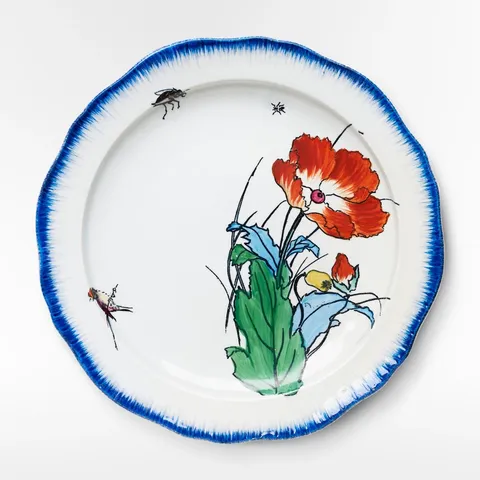
Poppy Plate
A red poppy, two bugs and a blue rim.
$54
1
Layout
The button says what it's doing, adding then added, and makes room for a way to the cart.
A red poppy, two bugs and a blue rim.
$54
Reduced motion: The button changes width at once, and "View cart" fades in without sliding.
A button that works out of sight leaves people pressing it twice. "Adding…" while the request is out, then "Added ✓" with a link to the cart, answers the question before it's asked. But a label that changes length changes the button's width, and a button that snaps between widths looks broken.
The button is a layout element, so its width animates whenever its label changes it. The label inside is layout="position": it travels to its new place in the button without stretching as the button scales. "View cart" enters beside it through an <AnimatePresence>. Set a longer delay, or a failure, in the store's settings (⚙) to see the states in between.
On Foldkit the add is a Command over the store, its answer a Message that tells the app the cart changed (an OutMessage), and the three-second reset a Command's sleep, interrupted by the next add.
import { formatPrice } from "@wardic/example-storefront-shared/format"
import { photoOf, srcsetOf } from "@wardic/example-storefront-shared/images"
import { Cart, Product } from "@wardic/example-storefront-shared/server"
import * as Effect from "effect/Effect"
import * as Schema from "effect/Schema"
import * as Command from "foldkit/command"
import { defineMessageUnion } from "foldkit/message"
import { defineView } from "foldkit/submodel"
import { problemLine } from "~/lib/view.ts"
import { wardic } from "~/lib/wardic.ts"
import { cartChanged, definePage, type PageEnv } from "~/page.ts"
import { Shop } from "~/shop.ts"
import { textOf } from "~/shop/text.ts"

// "View cart" slides out from behind the button once the piece is in the cart.
const viewCart = {
  initial: { opacity: 0, x: -12 },
  animate: { opacity: 1, x: 0 },
  exit: { opacity: 0, x: -12, transition: { type: "tween", duration: 0.12 } },
} as const

const Data = Schema.Struct({ piece: Product })
const Model = Schema.Struct({ piece: Product, quantity: Schema.Number, adding: Schema.Boolean, added: Schema.Boolean, problem: Schema.NullOr(Schema.String) })
type Model = typeof Model.Type
const Message = defineMessageUnion({ Fewer: {}, More: {}, Buy: {}, Added: { cart: Cart }, Failed: { reason: Schema.String }, Reset: {} })
type Message = typeof Message.Type

const Add = Command.define("AddToCartBuy", {
  args: { id: Schema.String, quantity: Schema.Number },
  messages: [Message.Added, Message.Failed],
  execute: ({ id, quantity }) =>
    Shop.use((shop) => shop.addToCart(id, quantity)).pipe(
      Effect.map((cart) => Message.Added({ cart })),
      Effect.catch((error) => Effect.succeed(Message.Failed({ reason: textOf(error) }))),
    ),
})

/** "Added ✓" stays a few seconds, then the button offers to add again; a new add starts the wait over. */
const ResetLater = Command.define("AddToCartReset", { messages: [Message.Reset], interrupt: true, execute: Effect.sleep("3 seconds").pipe(Effect.as(Message.Reset())) })

const labelOf = (model: Model): string => {
  if (model.adding) return "Adding…"
  if (model.added) return "Added ✓"
  return "Add to cart"
}

const view = defineView<Model, Message, PageEnv>((model, _env, h) => {
  const w = wardic.html(h)
  const image = photoOf(model.piece.id)
  return h.article([h.Class("buy-box")], [
    h.div([h.Class("photo")], [h.img([h.Src(image.small), h.Srcset(srcsetOf(image)), h.Sizes("160px"), h.Width(String(image.width)), h.Height(String(image.height)), h.Alt(model.piece.name)])]),
    h.div([h.Class("buy-body")], [
      h.h2([h.Class("name")], [model.piece.name]),
      h.p([h.Class("muted")], [model.piece.tagline]),
      h.p([h.Class("price")], [formatPrice(model.piece.price)]),
      h.div([h.Class("buy-row")], [
        h.div([h.Class("stepper"), h.Role("group"), h.AriaLabel("Quantity")], [
          h.button([h.AriaLabel("One fewer"), h.Disabled(model.quantity === 1), h.OnClick(Message.Fewer())], ["−"]),
          h.span([h.AriaLive("polite")], [String(model.quantity)]),
          h.button([h.AriaLabel("One more"), h.Disabled(model.quantity === model.piece.stock), h.OnClick(Message.More())], ["+"]),
        ]),
        // The button's width follows its label: layout animates the change, and the label,
        // Layout("position"), travels with it instead of stretching.
        w.button([h.Class("button accent buy"), w.Layout(), h.Disabled(model.adding), h.OnClick(Message.Buy())], [w.span([w.Layout("position")], [labelOf(model)])]),
        // display: contents: the presence's span is no flex item, so the row's gap doesn't count it.
        w.span([w.Presence(), h.Style({ display: "contents" })], model.added ? [w.keyed("a")("view-cart", [h.Class("view-cart"), h.Href("/layout/cart-drawer"), w.Initial(viewCart.initial), w.Animate(viewCart.animate), w.Exit(viewCart.exit)], ["View cart →"])] : []),
      ]),
      ...problemLine(h, model.problem),
    ]),
  ])
})

export default definePage({
  id: "add-to-cart",
  Data,
  Model,
  Message,
  load: Effect.map(Shop.use((shop) => shop.getProduct("poppy-plate")), (piece) => ({ piece })),
  init: ({ piece }): Model => ({ piece, quantity: 1, adding: false, added: false, problem: null }),
  update: (model, message) =>
    Message.match(message, {
      Fewer: () => ({ model: { ...model, quantity: Math.max(1, model.quantity - 1) } }),
      More: () => ({ model: { ...model, quantity: Math.min(model.piece.stock, model.quantity + 1) } }),
      Buy: () => ({ model: { ...model, adding: true, added: false, problem: null }, commands: [Add({ id: model.piece.id, quantity: model.quantity })] }),
      Added: ({ cart }) => ({ model: { ...model, adding: false, added: true }, commands: [ResetLater()], outMessage: cartChanged(cart) }),
      Failed: ({ reason }) => ({ model: { ...model, adding: false, problem: reason } }),
      Reset: () => ({ model: { ...model, added: false } }),
    }),
  view,
})