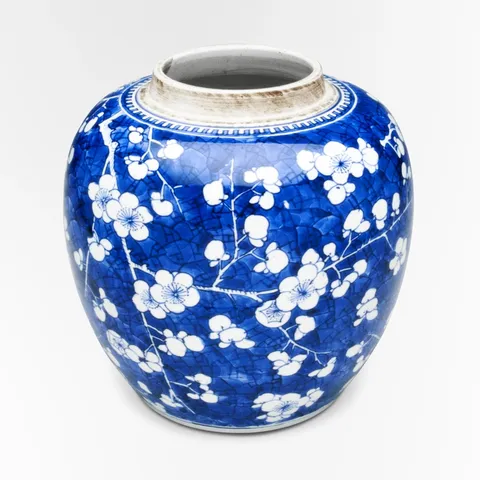
Blossom Ginger Jar$164
Live values
Move over a piece and its card tilts toward your pointer, with a soft light under it that follows.
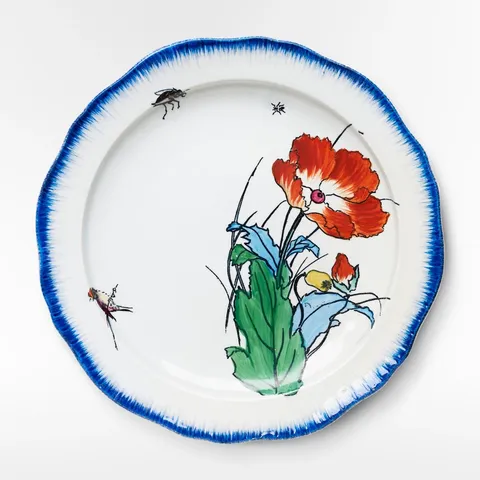
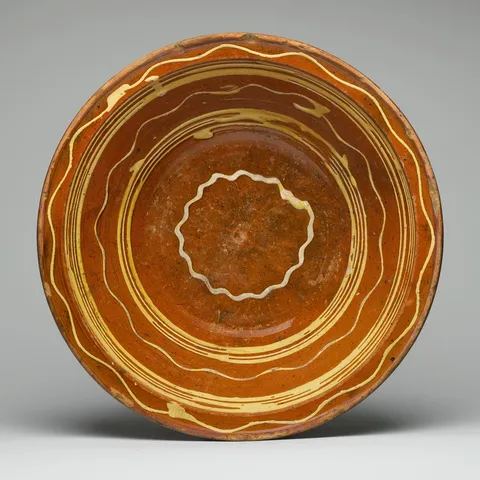
Reduced motion: The cards don't tilt, and the light is where the pointer is, without the spring. It still comes on and goes off.
A card that answers the pointer feels like an object: tilting toward where you point, with a light where your pointer is, it invites a closer look without a single extra control.
The pointer's place over the card, from -1 to 1 each way, is two signals that two createSprings follow, so the card eases toward the pointer and back to rest when it leaves. createTransform maps the springs twice: to rotateX and rotateY in the card's style, and to where its light sits, as custom properties the stylesheet's radial gradient reads. The light comes on through a variant that animates a custom property of its own, --light, from 0 to 1 under hover.
The card hears its hover from Wardic. On Solid 2, its ward is made beside the effects that read it and given to the element through wardRef. It only listens (w.ward()): the card's own props light it and tilt it. An effect over card.when("hover") hears the pointer over the card, from where it came in and at each move, with the card it's over (element, so no ref), and places the light and the tilt; one over card.when("hoverEnd") sends the card back flat. A hover at each move is Wardic's own: Motion's hover has only a start and an end. On Solid 1, the element's onHoverStart and onHoverEnd do the same, with its own pointermove for the moves in between. Touch never hovers, so on a phone the cards stay still.
On Foldkit each card's Mount reads the pointer over it as Live values, Wardic.pointer, a mouse's or a pen's, and two springs follow its place, centred and sent home once it has left (a derived Atom over inside); LiveValue.transform maps the springs to where the light sits, and the card's w.Style binds the tilt and the light's custom properties. The hover's variant is the card's own, w.WhileHover. Touch never hovers, so on a phone the cards stay still.
import { PRODUCTS } from "@wardic/example-storefront-shared/catalog"
import { formatPrice } from "@wardic/example-storefront-shared/format"
import { photoOf, srcsetOf } from "@wardic/example-storefront-shared/images"
import type { Product } from "@wardic/example-storefront-shared/server"
import * as Effect from "effect/Effect"
import * as Atom from "effect/reactivity/Atom"
import * as Schema from "effect/Schema"
import type { Html, HtmlBuilder } from "foldkit/html"
import { defineMessageUnion } from "foldkit/message"
import * as Mount from "foldkit/mount"
import { defineView } from "foldkit/submodel"
import { LiveValue, Wardic } from "@wardic/foldkit"
import { feed, onWardic, perKey } from "~/lib/live.ts"
import { wardic } from "~/lib/wardic.ts"
import { definePage, type PageEnv } from "~/page.ts"

const SHELF = PRODUCTS.filter((product) => ["poppy-plate", "blossom-jar", "slip-dish"].includes(product.id))

/** How far a card tilts toward the pointer at its edge, in degrees. */
const TILT = 8

// Under the pointer the card's light comes on: a custom property the stylesheet's glow reads.
const lighting = {
  rest: { "--light": 0 },
  lit: { "--light": 1 },
} as const

// ADR-0071, decision 16: Atoms at module scope, one set a card.
/** A card's Live values, what the view binds: the tilt, and where the light sits, custom properties the stylesheet's radial gradient reads. The card's Mount feeds them. */
interface CardValues {
  readonly rotateX: Atom.Writable<number>
  readonly rotateY: Atom.Writable<number>
  readonly lightX: Atom.Writable<string>
  readonly lightY: Atom.Writable<string>
}

const cardValues = (): CardValues => ({ rotateX: Atom.make(0), rotateY: Atom.make(0), lightX: Atom.make("50%"), lightY: Atom.make("50%") })
const CARDS = perKey(SHELF.map((product) => product.id), cardValues)

const Data = Schema.Struct({})
const Model = Schema.Struct({})
type Model = typeof Model.Type
const Message = defineMessageUnion({ Lit: {} })
type Message = typeof Message.Type

/**
 * A card's Mount: the pointer over the card as Live values (`Wardic.pointer`), a mouse's or a pen's,
 * the default, since a finger never hovers. Its place, from -1 to 1 across and down with 0 at the centre, and the centre
 * once it has left, is what two springs follow, so the card eases toward the pointer and back to
 * rest; the tilt and the light's place are read from the springs, and the view's Atoms follow them.
 * Under reduced motion the card doesn't tilt, and the light is where the pointer is: the springs jump.
 */
const Tilt = Mount.define("SpotlightTilt", {
  args: { id: Schema.String, reduced: Schema.Boolean },
  messages: [Message.Lit],
  execute: ({ element, id, reduced }) =>
    onWardic(
      Effect.gen(function* () {
        const values = CARDS[id]
        const skipped = () => reduced
        const { xProgress, yProgress, inside } = yield* Wardic.pointer(element)
        // The pointer's progress across the card, as a place from -1 to 1 about its centre: a leave keeps the place, so the centre once it has left is read here.
        const centred = (progress: Atom.Atom<number>): Atom.Atom<number> =>
          Atom.make((get) => {
            if (get(inside)) return get(progress) * 2 - 1
            return 0
          })
        const springAcross = yield* LiveValue.spring(centred(xProgress), { stiffness: 260, damping: 22 }, skipped)
        const springDown = yield* LiveValue.spring(centred(yProgress), { stiffness: 260, damping: 22 }, skipped)
        const tilt = (degrees: number) => (at: number) => {
          if (reduced) return 0
          return at * degrees
        }
        yield* feed(Atom.map(springAcross, tilt(TILT)), values.rotateY)
        yield* feed(Atom.map(springDown, tilt(-TILT)), values.rotateX)
        yield* feed(yield* LiveValue.transform(springAcross, [-1, 1], ["0%", "100%"]), values.lightX)
        yield* feed(yield* LiveValue.transform(springDown, [-1, 1], ["0%", "100%"]), values.lightY)
        return Message.Lit()
      }),
    ),
})

const card = (h: HtmlBuilder<Message>, env: PageEnv, product: Product): Html => {
  const w = wardic.html(h)
  const values = CARDS[product.id]
  const photo = photoOf(product.id)
  return h.li([], [
    // Keyed by the reduced-motion setting: the switch mounts the card afresh, and its Mount reads the setting once.
    w.keyed("article")(
      `${product.id}-${String(env.reduceMotion)}`,
      [
        h.Class("spot-card"),
        h.OnMount(Tilt({ id: product.id, reduced: env.reduceMotion })),
        w.Variants(lighting),
        w.Initial("rest"),
        w.Animate("rest"),
        w.WhileHover("lit"),
        w.Style({ rotateX: values.rotateX, rotateY: values.rotateY, "--light-x": values.lightX, "--light-y": values.lightY }),
      ],
      [
        h.div([h.Class("photo")], [h.img([h.Src(photo.small), h.Srcset(srcsetOf(photo)), h.Sizes("(max-width: 640px) 100vw, 240px"), h.Width(String(photo.width)), h.Height(String(photo.height)), h.Alt(product.name)])]),
        h.div([h.Class("line")], [h.span([h.Class("name")], [product.name]), h.span([h.Class("price")], [formatPrice(product.price)])]),
      ],
    ),
  ])
}

const view = defineView<Model, Message, PageEnv>((_model, env, h) => h.ul([h.Class("spot-grid")], SHELF.map((product) => card(h, env, product))))

export default definePage({
  id: "spotlight",
  Data,
  Model,
  Message,
  load: Effect.succeed({}),
  init: (): Model => ({}),
  update: (model, message) => Message.match(message, { Lit: () => ({ model }) }),
  view,
})